
Care-team coordination
How to Keep an NDIS Care Team on the Same Page
Agree where current information lives, who maintains it and how changes reach the people who need them. Includes free care-team communication and update templates.
Published 30 June 2026 · Updated 23 October 2026
Written by Callum Cruikshank — Founder of Kinovo
Callum draws on his family's lived experience of coordinating support. These resources offer practical coordination ideas, not clinical, legal or NDIS funding advice. No independent clinical review is claimed.

To keep an NDIS care team on the same page, agree where current information lives, who will maintain each part, and how important changes will reach the people who need them. Include a way to ask questions and follow up anything still unanswered. Saving an update is only part of the work.
You may already have caring, capable people involved. The difficulty is often the space between their conversations, appointments and shifts: someone knows what changed, while someone else is still using yesterday's information. A workable communication agreement helps people contribute their part without making the participant or a family member the messenger for everything.
Use the free communication tools
The two-page printable PDF and editable text contain a communication agreement and a care-team update. Both are also copyable below. Adapt them to your team, using the fields that help and adding context where it is needed. No Kinovo account or email signup is required.
- Download the communication agreement and update (2-page PDF)
- Download the editable communication tools (TXT)
- Setting up a new team? Start with the NDIS care team setup checklist
To keep that shared picture connected between appointments, explore Kinovo’s NDIS care coordination software for participants, families and invited professionals.
Agree who will do what, without giving everyone the same access
Begin with the participant's priorities and preferred way of taking part. The NDIA's supported decision-making policy centres people's rights, will and preferences, including access to support for decisions. Needing help to communicate does not mean someone else should automatically decide for them.
A family member or friend can contribute valuable context when the person wants them involved. That involvement does not, by itself, give authority to make decisions or consent on the person's behalf. If a nominee, guardian or other representative is involved, check the scope of their authority for the particular matter.
- Contribution
- Participant's direction
- What to clarify together
- How the person wants to take part, receive updates, give feedback and get support with decisions.
- Contribution
- Information maintenance
- What to clarify together
- Who has agreed to keep each relevant item current, and who can correct it. Different people can maintain different parts.
- Contribution
- Action and follow-up
- What to clarify together
- The next step, the person who has accepted it, the expected result and the timing they have agreed to.
- Contribution
- Provider or professional input
- What to clarify together
- Who can confirm the source instructions, explain a recommendation and arrange the handover or training their service needs.
- Contribution
- Sharing and access
- What to clarify together
- Who checks the sharing arrangements, manages access in each system and helps when someone cannot open information.
| Contribution | What to clarify together |
|---|---|
| Participant's direction | How the person wants to take part, receive updates, give feedback and get support with decisions. |
| Information maintenance | Who has agreed to keep each relevant item current, and who can correct it. Different people can maintain different parts. |
| Action and follow-up | The next step, the person who has accepted it, the expected result and the timing they have agreed to. |
| Provider or professional input | Who can confirm the source instructions, explain a recommendation and arrange the handover or training their service needs. |
| Sharing and access | Who checks the sharing arrangements, manages access in each system and helps when someone cannot open information. |
A role label is a starting point for a conversation, not a list of automatic permissions. Ask each contributor whether the task fits their role and capacity. If nobody has accepted a necessary task, record the gap and agree who will help resolve it. Do not silently pass it to a family member.
For plain-language explanations of care-team roles and terms, use the Kinovo glossary.
For the wider network of people who care about the participant, explore circles of support and their relationship to an NDIS care team.
Make updates part of the work people already do
Step 1
Choose communication the participant can use
Ask how the person wants to hear about changes and contribute: a conversation, accessible written notes, pictures, an interpreter, communication aids or support from someone they choose. Allow the time and support they need. Agree an alternative for people who cannot use the shared app or folder.
Step 2
Make the current source easy to recognise
Record the title, author or provider, date or version, and location of important documents. Make superseded working copies clearly identifiable so they are not mistaken for current instructions. Preserve records that need to be retained under the relevant provider, professional or legal requirements.
Step 3
Send important changes to the people affected
Update the agreed source, then contact the people whose next support or action is affected. Explain what changed, when it applies and what they need to do. Check they can open the source and clarify anything unclear; a notification or read receipt alone may not establish understanding or readiness.
Step 4
Agree what happens between updates
Choose a useful review interval together, based on the person's wishes, upcoming support and how quickly information changes. Routine updates can be grouped. A change affecting the next support needs attention before that support, using the agreed contact route. Ask the provider how urgent concerns, absences and disrupted support are handled.
Step 5
Follow through on open questions
Keep the unanswered question, last response, next agreed contact and person following it up together. When the response arrives, record the result and tell anyone whose work it affects. A request sent is different from a task accepted, and a reply received may still leave a question unresolved.
Step 6
Check the arrangement when the team changes
When someone joins, leaves or becomes unavailable, check responsibility, access and handover together. Agree a backup for work that cannot wait. Ask whether the arrangement is still helping the participant and whether anyone is doing work that others agreed to share.
Use the NDIS goal action worksheet to agree practical steps without losing the person’s goal.
If follow-up still means repeated chasing, the support coordinator follow-up guide shows how to make ownership and a useful response clearer.
The NDIS Commission's Working Together guide for workers supports ongoing communication about expectations, questions and changes. Its participant version offers questions for agreeing how support and feedback will work.
For request wording and stalled replies, use the support coordinator follow-up guide. For deciding what belongs in a message and what needs a current record, see the group chat guide below.
Example: follow a change through to the next support
This is a fictional example about an activity location, not a clinical instruction.
A proposal becomes a confirmed arrangement
Participant preference: Sam would like the next supported outing to be at the library rather than the usual cafe.
Still to check: the provider confirms the worker and transport arrangements with Sam. Until then, the record says 'requested; arrangements not yet confirmed'.
Confirmed update: Sam and the provider have agreed to the library outing on [date]. [Provider contact] confirmed the arrangements on [date]. The current outing details are at [location/version].
Follow-through: [accepted owner] will contact the assigned worker before the outing, check access to the details and resolve questions. If arrangements cannot be confirmed, they will contact Sam and the provider through the agreed route.
The useful part is the trail from the person's preference to a confirmed arrangement and a handover. Nobody has to infer that a suggested change has already been organised.
Care-team communication agreement
Prepare this with the participant using their preferred communication and decision support. This records how you will work together; it does not grant authority or permission to share information. Add space as needed.
Prepared with / date / person this is for: ___
What matters to the person now / preferred ways to communicate and take part: ___
Current information: location / source and version / who has agreed to maintain each part: ___
Sharing: information / recipients / purpose / consent or other lawful basis / checked by whom and when: ___
Routine updates: method / contributors / agreed review timing / who follows up gaps: ___
Important changes: who needs to know / how they will be contacted / how understanding is checked: ___
Urgent or disrupted support: agreed contact and backup route / where current arrangements are kept: ___
If someone is unavailable or cannot access information: agreed alternative / who will help: ___
Review: what will prompt a check / who accepts this task / how to request a correction or change sharing: ___
Copy a care-team update
Use when an update will help, at the interval agreed with the participant. Include enough context to act safely; link current instructions rather than rewriting them. This is not a monitored urgent-response channel.
Person / date or period / prepared by and with: ___
What matters to the person now / their feedback or requested change: ___
What changed: observation, proposal or confirmed decision? Source / date / effective from: ___
Current document or instruction: title / author or provider / version or date / location: ___
Agreed next action / person who accepted it / expected result / agreed timing: ___
Unanswered question or missing information / who will check / next contact or review: ___
Who needs this update / sharing checked / how sent / acknowledgement or clarification still needed: ___
Next review or correction needed / who has agreed to follow through: ___
When the issue needs a conversation rather than an update, use the care-team meeting agenda.
When information is missing, conflicting or unanswered
You do not have the full information yet
Record what is known, what remains uncertain and who will check it. Keep a proposal or unverified detail visibly separate from confirmed information. If missing or conflicting instructions could affect safe support, contact the responsible provider, supervisor or professional before the relevant activity and use the agreed escalation arrangements. Do not fill the gap with a guess.
Nobody replies, or nobody has accepted the next step
Check that the request reached the right person and says what answer or action is needed. Ask whether they can take it on, or who can. If support may be disrupted, use the provider's agreed contact or escalation route rather than waiting for the next routine update. Record the unresolved issue so another person can continue without starting again.
People disagree about what should happen
Separate the participant's wishes, the differing observations and any professional advice. Ask what decision actually needs to be made and what support the participant wants to make it. Seek clarification from the relevant person rather than treating the loudest message, a majority vote or an app permission as authority.
The system is too hard to maintain
Find the point where information stops reaching people. It may be an unread inbox, inaccessible document, duplicate entry or responsibility nobody agreed to take. Adjust that part together. An agreed phone handover, accessible note or printed current instruction may work better for someone than another login; record important outcomes in the appropriate place afterwards.
Check sharing and access as well as the content
Where sharing relies on consent, check that it is informed, voluntary, current and specific to the information, purpose and recipients. The OAIC's consent guidance explains these principles and withdrawal of consent. Providers must also meet the privacy and recordkeeping obligations that apply to them; consent is not the only possible legal basis for handling information.
- Agree the relevant information and enough context for the task. Avoid routinely sending the whole file or reducing an instruction to a summary that loses necessary detail.
- Check the actual recipients and document permissions before sending. Review both shared links and system access when a person's role or sharing choices change.
- Keep current professional instructions available through the agreed process. Coordination notes do not authorise changes to medication, manual handling or behaviour support instructions.
- Discuss how to request a correction or change sharing. Removing access does not retrieve copies already downloaded or remove a provider's obligation to keep required records.
The NDIA's plan-sharing guidance explains permissions for information the Agency shares through its processes. Those permissions are separate from sending a document directly or managing a Kinovo Team. A Kinovo Team leader's software permissions do not make them a nominee, guardian or authorised decision-maker.
For a fuller sharing discussion, see who should see my NDIS plan.
Keep the person’s view and missing answers clear with the supported decision-preparation note.
Using this approach in Kinovo
Kinovo brings shared context, goals, actions, important information and relevant files together around one person, with invited access. Use the communication agreement to decide who contributes what and the update template to explain meaningful changes. People still need to check sharing, accept responsibilities and confirm the handover their work requires. The same approach can be used with a suitable folder, communication book or existing system.
If responsibility for the next step is unclear, use the care-team roles guide and shared task map.
Before adding another tool, try the NDIS care coordination app decision worksheet to define the job and test one task with the people involved.
Official guidance checked for this resource
These sources support the communication, decision-making and sharing principles above. The practical workflow and templates are Kinovo's suggestions, not an NDIA requirement or a substitute for individual advice.
From template to live workspace
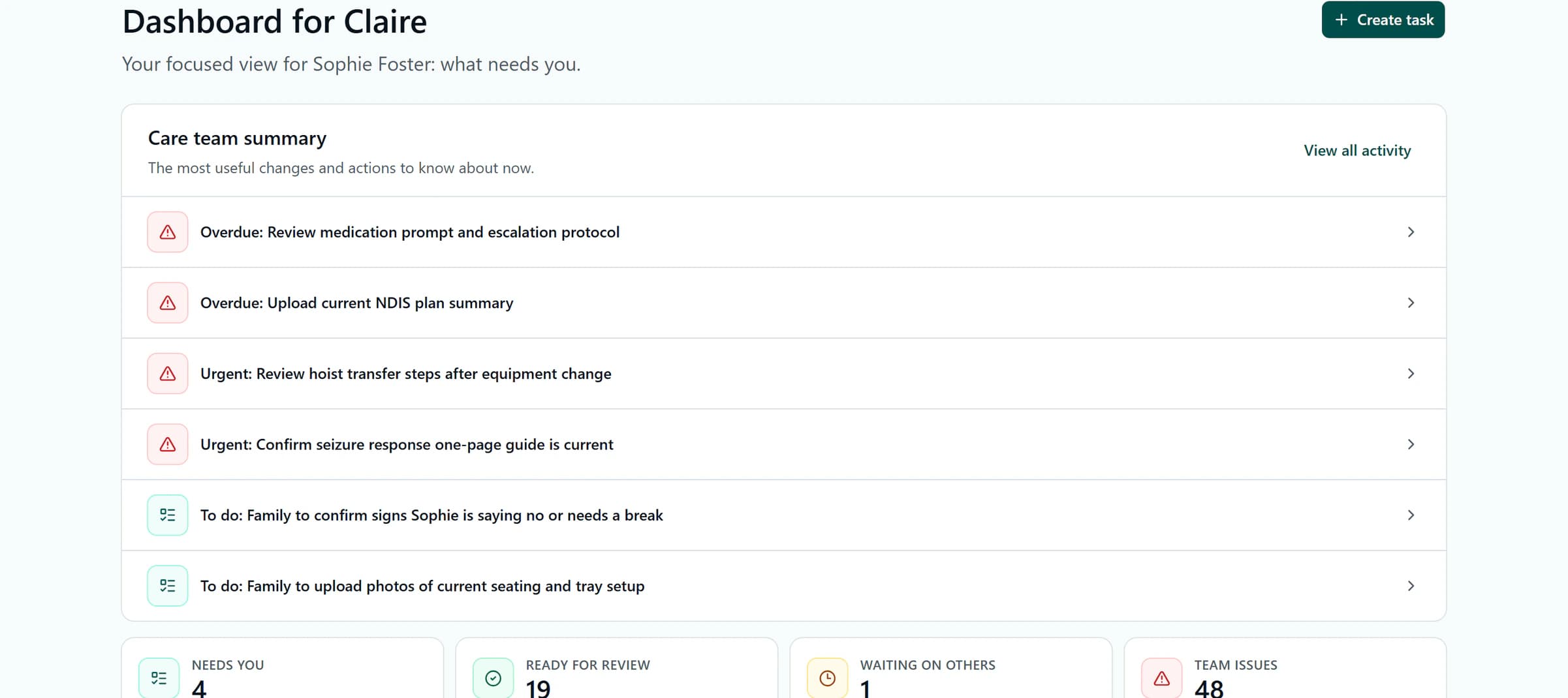
This is what Kinovo keeps live inside a shared care-team workspace.
If the team needs a shared place for this work, Kinovo connects current context, goals, actions and relevant documents around the participant. Start with information people have agreed to contribute and check that invited members can find what they need.
Choose a Free account or review optional paid plans. No card is needed for a Free account or no-card trial.
FAQ
How often should an NDIS care team send updates?
Agree an interval that suits the participant, the support being provided and how quickly information changes. There is no single routine that fits every team. Routine matters can be grouped, while a change affecting the next support needs to reach the relevant people before that support through the agreed contact route.
Does everyone need to use the same app?
A shared system can help, but people need a way to receive and understand the information relevant to their work. Agree an accessible alternative when someone cannot use it, who will pass on important changes and where the confirmed outcome will be recorded. Check the arrangement with the participant and providers involved.
Who should maintain the shared care-team information?
Agree contributions with the people best placed to make them. A provider may maintain its instructions, an accepted action owner can update their progress, and the participant can contribute in the way they prefer, with support if wanted. Do not assume a family member will enter, check and follow up everything.
What if an update contains an error or conflicting instructions?
Make the uncertainty visible and contact the person responsible for the source. Do not treat a new message as an automatic replacement for current professional instructions. If the issue could affect safe support, use the responsible provider's clarification and escalation process before the relevant activity, alongside agreed emergency arrangements where needed.
Disclaimer
General coordination information, not individual legal, clinical, privacy or NDIS funding advice. Use current professional instructions and provider processes. For urgent concerns or emergencies, use the agreed immediate-response arrangements rather than waiting for a shared update to be read.
Related resources
NDIS Care Team Setup Checklist: What to Add First
Read resourceHow Support Coordinators Can Reduce Chasing Without Adding More Admin
Read resourceWho should see my NDIS plan (and who should not)
Read resourceThe group chat is not the current plan
Read resourceWhat to give a new support worker in week one
Read resourceCare Instructions for NDIS Support Workers: Keep the Current Version Easy to Find
Read resource