Skip to content

For NDIS professionals

Keep the next step clear across care teams.

Kinovo is a private online workspace connecting participants, families and invited professionals. See relevant actions, updates and waiting work across the client teams you have joined. Open the right context, contribute your part and keep the team informed.

See how it works in under 2 minutes. No account needed to watch. Create your account before receiving an invitation, then join or help create a workspace with permission. Current access is free for a limited time, with no payment card required.

Professional walkthrough · 1 minute 52 seconds

Watch how a professional moves from the cross-client picture into the work that needs them.

  • Every invited client stays separate
  • See what needs you first
  • Open the context behind the action
  • Update ownership, waiting or progress

A practical example · fictional care team

One request. Clear ownership. Shared progress.

A participant needs an equipment report. Here is how the coordinator, OT and family can keep the request, response and next step together in Kinovo.

  1. Support coordinator

    Ask for the report.

    Add a request linked to the equipment goal. Assign it to the OT, with the context and a needed-by date.

  2. Occupational therapist

    Contribute in the same place.

    Open the request, add the relevant report and a short response, or explain what is still needed.

  3. Family and invited team

    See what happens next.

    The Team leader reviews the response. Permitted team members can see progress and the next action without a separate briefing.

Each client workspace stays separate, with access managed by its Team leader. Share the update or document the team needs; keep formal case notes and records in your professional systems.

From signal to shared context

Start with what needs you, then open only the client workspace behind it.

Open the client workspace, do the shared part, go back to your own records. It does not merge client records or turn every update into another case note.

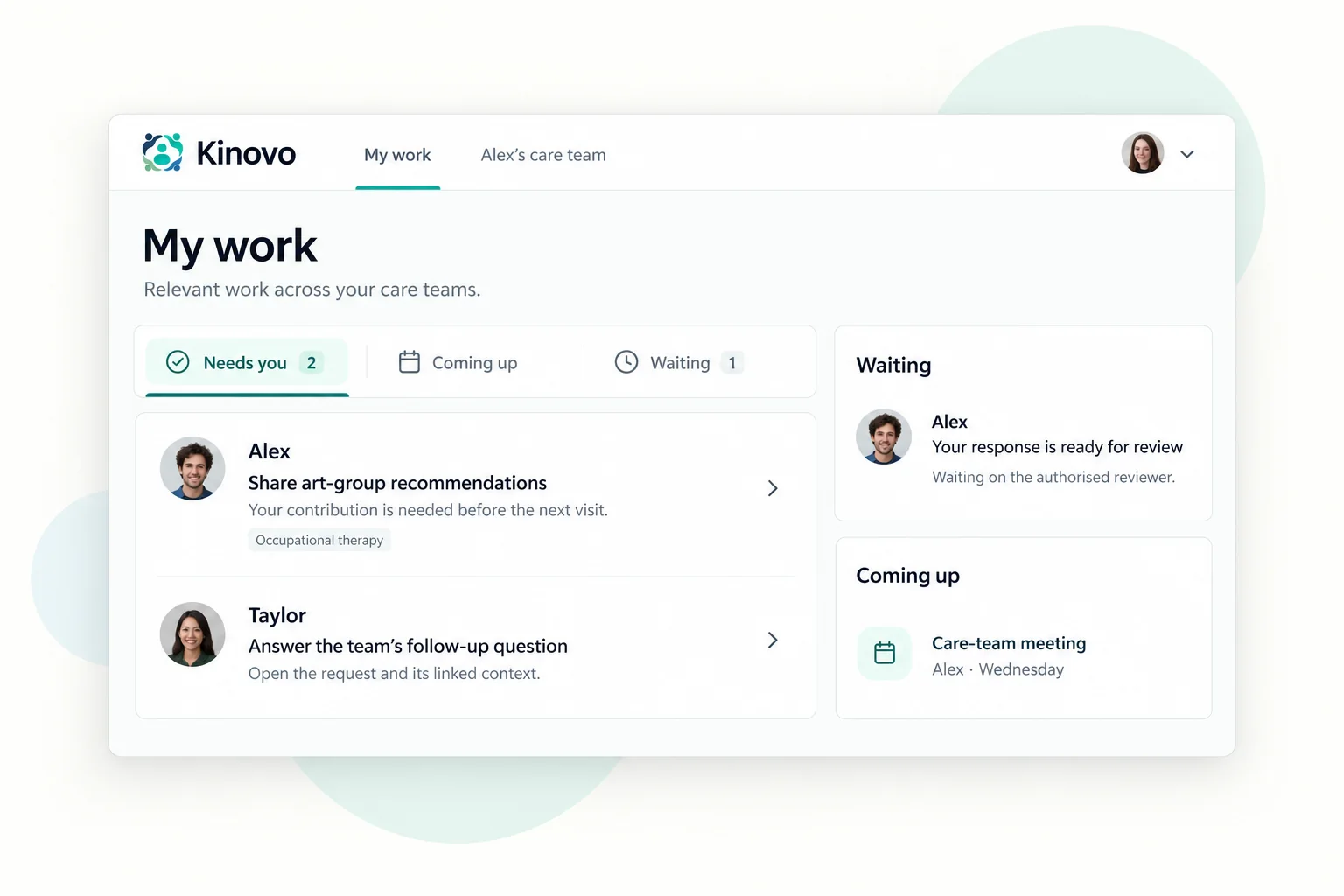
  1. Start across clients.

    Your professional dashboard highlights the assigned, due, waiting and review work that is personally relevant to you. It is one starting view—not one blended client record.

    Cross-client starting view
    A focused view of Kinovo’s professional dashboard showing the next useful care-team action and its shared context
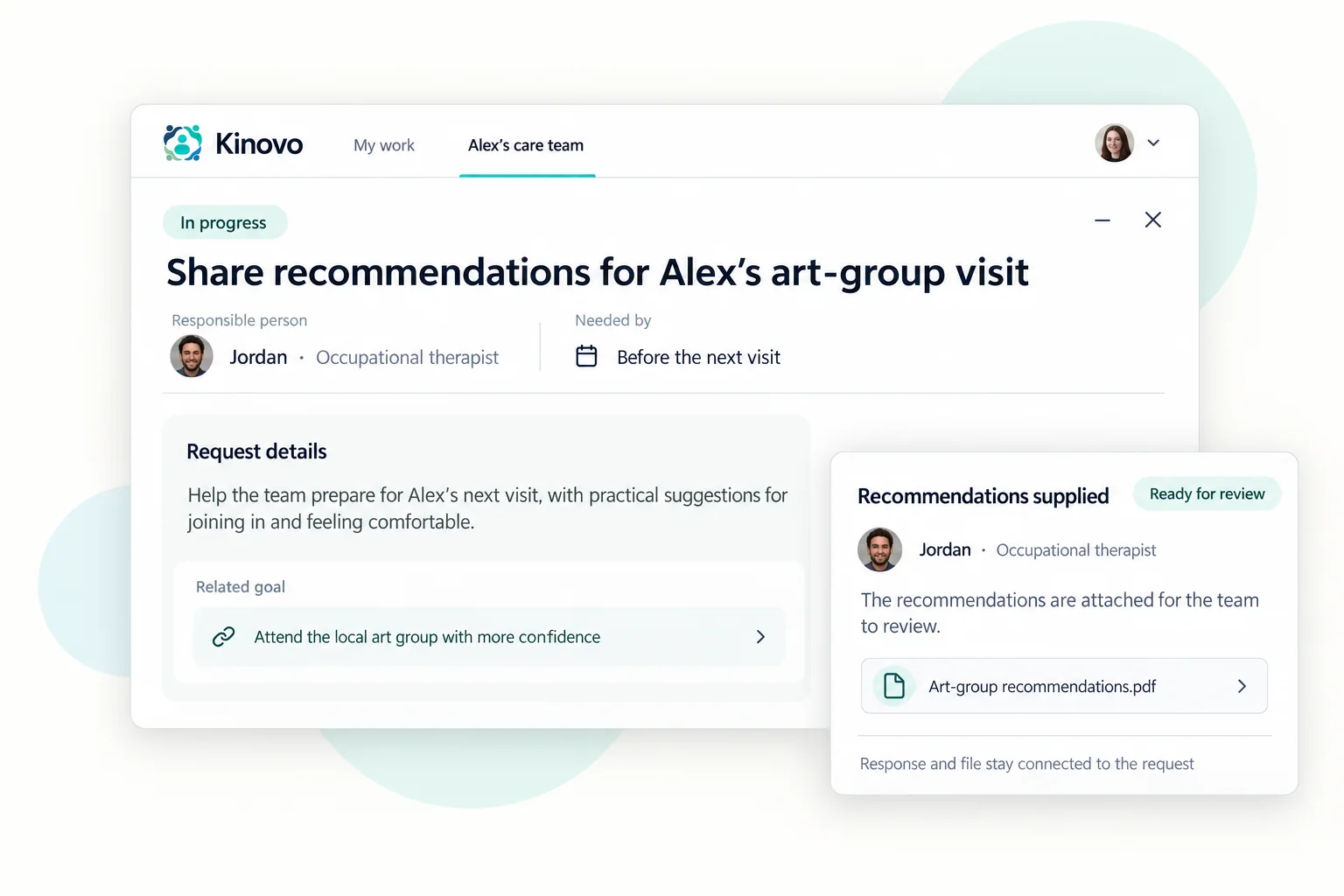
  2. Open the right context.

    Move into the separate client workspace behind the action. Open the relevant goals, actions, documents, Care Protocols, messages and team context before you respond.

    Separate client workspace
    A professional client workspace showing a chronological feed of fictional care-team updates and links to goals, Care Protocols and documents
  3. Contribute without duplicating records.

    Update shared ownership, waiting or progress in Kinovo. Keep formal case notes, clinical records, billing, rostering and organisational records in their appropriate systems.

    Shared goals and actions
    A focused goals and actions view where a professional can update ownership, timing and shared progress

Benefits by role

See the shared work in the language of your contribution.

The dashboard gives each professional a practical starting point. The client workspace then keeps the participant, family and invited team connected around the same action.

Support coordinators

The chasing is not because you forgot the report. See provider follow-up, plan-review evidence, waiting work and ownership across the client workspaces that have invited you.

Allied health

You should not need a 20-minute briefing to write the next letter. Open relevant goals, current practical context, requested reports and the next step connected to your contribution.

Support workers and key workers

The current ‘how we support this person’ should not only live with whoever was on shift last. Find current Care Protocols and leave concise practical updates where the approved care team can use them.

Providers and service teams

Coordinate shared client-facing work while rostering, billing, staffing and internal operations stay in your existing systems.

Clear system boundaries

Use Kinovo for shared action—not duplicate record-keeping.

Kinovo holds the concise context an approved care team needs between appointments, providers and organisations. Your professional systems keep doing the jobs they were designed to do.

What belongs in Kinovo

  • Shared goals, actions, ownership and next steps
  • Concise progress or waiting updates the care team needs
  • Current Care Protocols and shared practical context
  • Relevant documents, requests, messages and review work

What stays in your existing systems

  • Formal case notes and clinical records
  • Billing, invoicing and accounting records
  • Rostering, staffing and provider operations
  • Organisation-specific compliance and reporting
Olivia · Separate client workspaces
Kinovo’s professional client list keeps every invited care-team workspace separate and shows the current focus before it is opened

Privacy, participant control and access

A professional account opens the door—not every client record.

Every invited client workspace remains separate. You can accept an invitation, request access, or help create a workspace with the participant or family’s permission. Your account alone never grants client access.

Verified in the current product

What client-workspace access means in practice.

  • Invite-only care-team workspacesA care-team workspace is not public. People join through a direct invitation or an access request the Team leader explicitly approves.
  • Role-aware accessWhat someone can see or change depends on their active workspace membership, role, permissions and item visibility.
  • Private file handlingCare-team files are stored privately. Downloads and previews are issued only after workspace and document-visibility checks.
  • A named Team leader controls shared accessEach workspace has one active Team leader—the person trusted to manage access, roles and shared oversight.
  • A clear product boundaryKinovo is a coordination workspace. It does not replace provider, clinical, billing, rostering or emergency systems.

These are current product controls and boundaries. No online service can guarantee absolute security.

A useful first step by email

Get the professional care-team action templates by email.

Use the free Care Team Clarity Starter Pack to clarify ownership, write a useful shared update and track evidence for review work—even before your team is ready to use Kinovo.

Need something you can use immediately? Read the free support-coordinator workflow guide and copyable request templates, or organise review preparation with the NDIS plan review checklist and reassessment evidence tracker.

For a team discussion, start with the care-team meeting template.

Get the action templates

Questions professionals ask

Clear answers before you create an account.

Participant-controlled access keeps every client workspace separate.

Is this another provider CRM or practice-management system?

No. Kinovo is a shared client-facing workspace for the work that crosses a care team. Your CRM or practice-management system remains the home for internal operations, formal records, billing and organisational reporting.

Will I have to duplicate case notes?

No. Add the concise update the approved care team needs to understand progress, ownership or what is waiting. Keep formal case notes, clinical records and organisation-specific documentation in their required systems.

Can I work across several care teams?

Yes. Your professional dashboard brings personally relevant work from your invited client workspaces into one starting view. Each client workspace remains separate, and you only enter the teams you are allowed to access.

How do I join a client workspace?

Accept an invitation from the care team, request access to an existing client workspace, or help create one with the participant or family’s permission. Access is never assumed just because you have a Kinovo account.

Can I create an account before receiving an invitation?

Yes. You can create your free professional account independently, confirm your email and finish your profile. You can join, request access or help create a client workspace when the care team is ready.

Who controls what I can see?

The participant or family keeps the shared workspace centred on the person. Their Team leader manages invitations, roles and access, and every client workspace remains permission-specific.

How long is full MVP access free?

For a limited time, with no payment card required. A one-client professional plan is intended to stay free, while broader paid plans will be introduced later with notice before anything changes.

Is Kinovo only for NDIS professionals?

This page and Kinovo’s current acquisition focus are designed around NDIS care teams. The same participant-controlled coordination approach can also support family-led teams around ageing, recovery and ongoing care.

Start with one useful client priority.

Create a professional account, then join or help create a workspace when the participant or family is ready.

Need a quick start? Get the free Starter Pack or get free setup help while available.